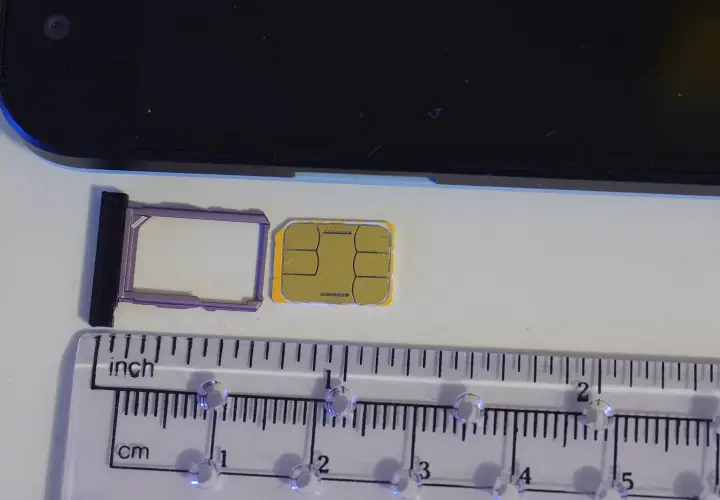
A working phone makes your first day in Jordan easier: you can contact your driver, find your building and receive messages while you settle in. A local subscriber identity module (SIM) gives your phone access to a Jordanian network. An embedded SIM (eSIM) installs digitally on a compatible phone, so there is no plastic card to insert.
For a student at German Jordanian University (GJU), choose a line you can keep using through the semester. Start with a prepaid plan, understand its renewal and test it where you live. Our Zain Jordan, Orange Jordan and Umniah plan comparison sets out prices and allowances; this guide covers getting connected.
What to prepare before you travel
- Bring your original, valid passport to the operator. Keep it accessible when you arrive, rather than buried in checked luggage.
- Check whether your phone is unlocked for other networks. A phone still locked to your home provider may reject a Jordanian line.
- For a digital SIM, check your exact device model and country variant in its settings or manufacturer guidance. Look for an “Add eSIM” option; do not assume every version of the same phone supports it.
- Download your arrival address and the campus building location for offline use. Save a contact number for your first appointment.
- Decide whether you need a Jordanian number for calls and text messages. An internet-only product may not provide either.
Umniah states that visitors can register and activate its visitor line with a valid passport, without a Jordanian identity card. Its general visitor page describes no-commitment plans. Individual package restrictions still apply: the 10-day product terms specify non-Arab visitors. Being a foreign passport holder does not make every offer available to you. Umniah visitor eligibility; 10-day package conditions.
Choose a physical SIM or a digital SIM
| Option | What you need | When it helps |
|---|---|---|
| Physical SIM | An unlocked phone with a compatible card slot; somewhere safe to keep your home card. | Useful if your phone does not support digital profiles or you want staff to insert the card. |
| Digital SIM | A compatible, unlocked device and internet access to install the profile. | Useful if you want to keep your home card in its slot. Active dual-line support depends on your device. |
| Internet-only line | A compatible device plus a separate way to make ordinary calls if needed. | Useful for a tablet or mobile router; less convenient as your only contact number. |
Zain Jordan’s visitor shop offers physical and digital options. It lists physical-card collection at its airport shop and digital activation on arrival. Place an online order only when its collection or activation instructions fit your landing time. Zain Jordan visitor ordering options.
Buying at the airport or in Amman
At Queen Alia International Airport (QAIA), buying or collecting a line before you leave can be useful if you need to contact someone immediately. In Amman, an official operator shop can help with registration, activation and later account questions. Choose the location around your arrival plans; a city shop is not automatically cheaper.
Use the operator’s official checkout or shop finder, and check the particular branch before travelling there. For Orange Jordan, the official shop finder lets you look for a suitable store. If you pre-order, save the order reference and collection instructions offline. Do not assume an online promotional price is the same offer sold at a counter.
At the shop, say how long you are staying, whether you need calls and whether you want a physical or digital card. For a semester, ask what happens at the end of the first package: the renewal amount, allowance, validity and whether you can change plan while keeping the number. Your mobile package and your immigration permission have separate expiry dates.
Understand the amount you will pay
Ask for the total due today, including tax and any compulsory SIM, activation or first-recharge fee. Then ask for the amount needed for the next renewal. A prepaid credit balance and an active data bundle are different: topping up money does not always mean a new package has started.
The expiry period matters as much as the headline price. Ten days will cover an arrival period but will run out well before a month. For an actual comparison, use the mobile-plan table with validity and setup fees. Keep your receipt and a screenshot of the package name, expiry and remaining allowance.
Activate a digital SIM step by step
- Connect to a trusted Wi-Fi network and update your phone software if required. Have the operator’s activation instructions ready on another screen or on paper.
- Open your phone’s mobile-network settings and choose the option to add a digital SIM. Scan the QR code supplied by the operator, or follow its app-based installation instructions.
- Wait for the profile to install and connect. Label the line “Jordan” so you can recognise it later.
- Choose the Jordan line for mobile data. Select your preferred line for ordinary calls and messages, especially if both your home and Jordanian lines remain active.
- Turn Wi-Fi off briefly and test a web page. Test an ordinary call and incoming text if your package includes them. Ask staff to fix any activation problem before leaving.
Orange Jordan instructs users to install through network settings while connected to Wi-Fi. Its QR voucher is single-use: if you delete the profile or need a replacement after a lost phone, its guidance directs you to a smart store for a new code. Keep the profile installed when troubleshooting; ask the operator before deleting it. Orange Jordan digital SIM activation and replacement guidance.
Keep your home number without accidental roaming
If your phone supports two active lines, you can keep your home number available for bank messages while using your Jordan line for data. Check your home provider’s charges for receiving messages, calls and roaming. Turn off data roaming on the home line and disable automatic mobile-data switching if it could use that line. Follow the Jordanian operator’s instructions for the local profile; international travel profiles may use different roaming settings.
Store the physical home card securely if you remove it. Tell important contacts which number to use, and check your messaging app’s number-change settings before changing anything. Sharing a phone number does not require sharing passwords or one-time verification codes.
Your first-week mobile routine
Install the operator’s official account app, check that the line is registered in your name and set a reminder before the bundle expires. Switch large software updates and cloud backups to Wi-Fi. If you will tether a laptop, check that the selected package allows a hotspot and watch its consumption. A laptop update can use a substantial share of a phone allowance.
For university errands, combine this with the first-week university checklist and the German Jordanian University (GJU) Jabal Amman campus guide. Plan your first food shop with our Jabal Amman grocery guide.
Getting connected at your apartment
Before committing to a larger mobile bundle, test reception inside your actual room and ask what home internet is included. Our rooms and apartments for rent in Jabal Amman for students are available by room or as an entire apartment. Confirm the unit, dates, price and internet arrangements when discussing your stay; do not assume a phone plan can replace a home connection for a whole semester.